



When a publisher sells an advertising campaign, the work does not end with a confirmed booking. The campaign still needs to be prepared, configured, scheduled, launched, monitored, and reported. Every detail must be handled correctly to ensure that the advertiser receives the placement and delivery they agreed to purchase.
This process is known as campaign trafficking.
For digital publishers managing direct-sold advertising, campaign trafficking is one of the most important parts of daily AdOps operations. It connects the commercial agreement made by the sales team with the actual advertisement displayed on the publisher's website.
Although the process may sound technical, its purpose is straightforward: make sure the right advertisement reaches the right placement at the right time and runs according to the agreed campaign requirements.
However, campaign trafficking involves more than uploading a banner or selecting an advertising position. It requires coordination between sales teams, advertisers, creative assets, inventory, campaign schedules, and performance reporting.
Without a clear process, publishers can experience incorrect placements, delayed launches, creative errors, scheduling conflicts, and reporting difficulties.
Understanding how campaign trafficking actually works helps publishers recognize why each stage matters and how a structured AdOps workflow supports better campaign delivery.
1. What Is Campaign Trafficking?
Campaign trafficking is the process of setting up, managing, and coordinating an advertising campaign so that it can run correctly on a publisher's digital properties.
It begins after an advertiser confirms a campaign and the publisher receives the necessary booking information.
The AdOps team takes the campaign requirements and translates them into an operational setup.
This usually includes:
Reviewing campaign details and requirements.
Confirming the advertising inventory and placement.
Receiving and checking creative assets.
Configuring campaign settings.
Setting campaign start and end dates.
Verifying advertisement display.
Monitoring campaign delivery.
Preparing performance reports.
For example, imagine a lifestyle publisher sells a homepage banner campaign to a fashion brand for 15 days.
The sales team confirms the booking and shares the campaign details with AdOps. The advertiser provides the banner creative and destination URL. The AdOps team checks the specifications, assigns the correct homepage placement, configures the schedule, and tests the advertisement before launch.
Once the campaign goes live, the team monitors its delivery and prepares a report at the end of the campaign.
All these activities form part of campaign trafficking.
In simple terms, campaign trafficking turns an advertising booking into a live, managed campaign.
2. Campaign Trafficking Begins With a Confirmed Booking
The first stage of campaign trafficking begins when the advertiser confirms an advertising agreement.
Before any technical setup happens, the publisher needs to understand exactly what has been sold.
The sales team usually communicates the campaign requirements to the AdOps team through a campaign brief, booking document, email, or internal campaign management system.
This handover is important because the AdOps team depends on accurate information to configure the campaign.
A typical campaign booking includes:
Advertiser name.
Campaign name.
Campaign objective.
Agreed advertising placement.
Campaign start date.
Campaign end date.
Creative format and dimensions.
Destination URL.
Delivery expectations.
Reporting requirements.
Consider a publisher that sells a banner advertisement on its homepage and article pages.
The advertiser may want to promote a new product launch over a specific period. The sales team confirms the available placements and campaign duration.
Once the agreement is finalized, these details are shared with AdOps.
If the campaign brief is incomplete, the setup process may be delayed while the team requests missing information.
That is why a complete booking handover is the foundation of effective campaign trafficking.
3. Understanding the Campaign Requirements
After receiving the booking, the AdOps team reviews the campaign requirements.
This stage ensures that the team understands what the advertiser expects and what needs to be configured.
Not every advertising campaign has the same requirements.
One advertiser may purchase a homepage banner, while another may request an article-page placement. Some campaigns may use static images, while others may require different creative formats.
The AdOps team needs to understand these differences before proceeding.
Important questions include:
Which advertiser is the campaign for?
What is the campaign trying to promote?
Which advertising placements have been purchased?
When should the campaign begin?
When should it end?
What creative formats are required?
Are there specific delivery or reporting expectations?
The team should also identify any special instructions included in the agreement.
For example, an advertiser may request that its campaign appear only within a particular website section.
If this requirement is overlooked during setup, the campaign may run in an unintended location.
Reviewing the booking carefully helps prevent misunderstandings before they become delivery problems.
4. Checking Available Ad Inventory
Once the campaign requirements are clear, the AdOps team needs to confirm the appropriate advertising inventory.
Ad inventory refers to the advertising spaces a publisher makes available for advertisers.
These placements may include:
Homepage banners.
Article-page banners.
Sidebar advertisements.
Category-page placements.
Mobile advertising positions.
Newsletter advertising spaces.
The exact inventory depends on the publisher's website, audience, content structure, and advertising offering.
During trafficking, the team must confirm that the placement sold to the advertiser is available for the requested campaign period.
For example, suppose a publisher has one premium homepage banner position.
An advertiser has already booked that placement for the first week of the month. A second advertiser requests the same placement during overlapping dates.
Without proper inventory visibility, the publisher may accidentally assign the same position to both campaigns.
This creates a scheduling conflict and can affect advertiser delivery.
Checking inventory availability helps the AdOps team confirm that the requested placement can be fulfilled.
It also gives publishers better control over how their advertising spaces are assigned and managed.
5. Receiving and Reviewing Creative Assets
After confirming the placement, the next step is managing the advertiser's creative assets.
Creative assets are the actual advertisements that will appear on the publisher's digital properties.
These may include:
Static banner images.
Animated banner files.
HTML5 creative files.
Video advertisements.
Destination URLs.
Tracking links, where applicable.
The advertiser generally provides the creative according to the specifications shared by the publisher.
The AdOps team must review these files before using them in the campaign.
The review may include checking:
Creative dimensions: Does the banner match the required width and height?
File format: Is the creative provided in an accepted format?
File quality: Is the advertisement clear and properly displayed?
Destination URL: Does the advertisement direct visitors to the correct landing page?
Creative approval: Is this the final version approved by the advertiser?
For example, if a publisher requires a banner measuring 728 × 90 pixels but receives a file with different dimensions, the AdOps team may need to request a corrected version.
Similarly, if the advertiser sends multiple versions of the same creative, the team must identify which one has final approval.
These checks help prevent incorrect advertisements from appearing during the campaign.
6. Configuring the Campaign
Once the campaign details, inventory, and creative assets are confirmed, the AdOps team moves to campaign configuration.
This is where the campaign is prepared within the publisher's advertising management environment.
The exact configuration process depends on the tools and systems used by the publisher.
However, it generally involves entering the campaign information and connecting the approved creative with the selected advertising placement.
Typical configuration details include:
Campaign and advertiser name.
Creative asset.
Selected placement.
Campaign start date.
Campaign end date.
Destination URL.
Delivery settings.
Relevant tracking information.
For example, a publisher may have a campaign for a technology company that has purchased a banner on its homepage for 10 days.
The AdOps team creates the campaign record, selects the correct homepage placement, uploads the approved banner, enters the destination URL, and configures the campaign schedule.
Every detail must match the original booking.
An incorrect advertiser name, creative assignment, or campaign date can create problems later.
That is why campaign configuration should follow a consistent checklist rather than relying entirely on memory or informal instructions.
7. Assigning the Correct Ad Placement
Campaign configuration also involves connecting the creative to the correct advertising placement.
This is a particularly important step because advertisers purchase specific advertising opportunities, not simply an advertisement appearing somewhere on a website.
For instance, a homepage banner may offer a different level of visibility from an advertisement placed within an article.
If the advertiser has purchased the homepage position, the campaign must be assigned to that specific location.
The AdOps team should verify:
The correct website or digital property.
The correct page or section.
The correct advertising position.
The appropriate creative format.
Any placement-specific requirements.
Placement assignment must also consider the publisher's existing campaign commitments.
If several campaigns are scheduled for the same advertising position, the team must ensure that their dates and delivery arrangements do not conflict.
Accurate placement assignment protects the advertiser's agreement and helps publishers manage their inventory more effectively.
8. Setting the Campaign Schedule
Once the campaign is configured and assigned to the correct placement, the AdOps team sets its schedule.
The schedule determines when the advertisement should begin appearing and when it should stop.
For direct-sold campaigns, accurate scheduling is essential because advertisers expect their advertisements to run during the agreed period.
The team needs to confirm:
Campaign start date.
Campaign end date.
Launch timing.
Any agreed scheduling restrictions.
Relevant changes or extensions.
Imagine an advertiser has booked a campaign from November 10 to November 24.
If the start date is entered incorrectly as November 12, the advertisement will not run according to the original agreement.
Similarly, if the end date is not updated correctly, the advertisement may continue appearing beyond its agreed period.
Both situations can create operational and advertiser communication problems.
A centralized campaign calendar helps teams maintain visibility into upcoming launches, active campaigns, and scheduled end dates.
It also makes it easier to identify overlapping bookings before they affect delivery.
9. Testing the Campaign Before Launch
Before a campaign goes live, the AdOps team should verify that the setup is correct.
This is an important quality-control stage.
Even when all campaign information has been entered correctly, technical or configuration issues can still occur.
A test helps identify these issues before the advertisement is exposed to the publisher's audience.
The team should check:
Does the advertisement appear in the intended placement?
Is the correct creative displayed?
Are the image dimensions correct?
Does the destination URL work?
Is the advertisement displaying properly on the relevant devices?
Are the campaign dates configured correctly?
Are there any unexpected display or formatting issues?
For example, a banner may appear correctly on a desktop website but display incorrectly on mobile.
If the publisher supports separate desktop and mobile placements, both should be checked where relevant.
Testing also helps confirm that the campaign is ready to launch according to the advertiser's expectations.
A simple pre-launch checklist can prevent avoidable problems and reduce the need for corrections after the campaign goes live.
10. Launching the Campaign
After the campaign passes the necessary checks, it can be launched.
The advertisement becomes active on the selected placement according to the configured schedule.
However, launching a campaign is not simply a matter of activating a setting.
The AdOps team should confirm that the advertisement is actually appearing as expected.
This includes checking the relevant website pages and verifying that the correct creative is visible.
For example, if a restaurant brand has purchased an article-page banner, the team should confirm that the banner appears within the intended article-page placement.
If the advertisement is missing or displaying incorrectly, the team needs to investigate and resolve the issue.
Once the campaign is confirmed as live, the relevant internal stakeholders may be informed so that sales and client-facing teams can provide accurate updates to the advertiser.
A successful launch establishes that the campaign has moved from booking to delivery.

11. Monitoring Campaign Delivery
Campaign trafficking does not end when an advertisement goes live.
The campaign must continue to be monitored throughout its scheduled duration.
Monitoring helps publishers confirm that the advertisement is running as expected and identify issues that may affect delivery.
The AdOps team may review:
Whether the advertisement is displaying correctly.
Whether the campaign remains active.
Whether the correct creative is being shown.
Whether the campaign is appearing in the intended placement.
Whether delivery is progressing according to expectations.
Whether technical problems require attention.
For example, an advertiser may report that its banner is no longer visible on a particular page.
The AdOps team needs to check the campaign configuration, creative status, placement assignment, and schedule to identify the issue.
Without consistent monitoring, a campaign problem may remain unnoticed until the advertiser reports it.
Regular checks help publishers respond more quickly and maintain better control over campaign delivery.
12. Managing Changes During an Active Campaign
Campaign requirements can change even after an advertisement has gone live.
An advertiser may request a new creative, update a destination URL, change a campaign end date, or revise certain campaign instructions.
These changes must be handled carefully.
The AdOps team should first confirm the requested update and understand how it affects the existing campaign.
For example, if an advertiser provides a revised banner during an active campaign, the team needs to:
Receive the updated creative.
Verify its dimensions and format.
Confirm that it is the approved version.
Replace the existing creative.
Check that the new advertisement displays correctly.
Record the update for campaign reference.
Without a clear process, outdated files may remain in use or important changes may not be communicated to everyone involved.
Campaign updates should always be documented so that the team has an accurate record of what changed and when.
This is especially important when several people are involved in managing the same campaign.
13. Handling Campaign Issues and Corrections
Even well-managed campaigns can experience unexpected problems.
The important thing is how quickly and accurately the publisher identifies and resolves them.
Common campaign issues include:
Advertisements not displaying.
Incorrect creative being used.
Broken destination links.
Wrong placement assignments.
Incorrect campaign schedules.
Unexpected display problems.
Delivery interruptions.
When an issue occurs, the AdOps team should follow a consistent troubleshooting process.
First, identify the problem and determine which campaign is affected.
Next, review the original booking and campaign configuration.
Then, investigate the creative, placement, schedule, or technical setup.
Once the cause is identified, make the necessary correction and verify that the campaign is working properly.
Finally, document the issue and communicate relevant updates to the appropriate stakeholders.
This approach helps prevent repeated mistakes and gives publishers a clearer understanding of campaign performance.
14. Completing the Campaign and Preparing Reports
When the campaign reaches its scheduled end date, the trafficking process moves toward completion and reporting.
The AdOps team reviews the campaign's delivery information and prepares a performance report based on the agreed reporting requirements.
Depending on the campaign, reports may include:
Campaign start and end dates.
Advertising placement details.
Total impressions.
Clicks.
Click-through rate (CTR).
Other agreed performance indicators.
Delivery observations.
For example, an advertiser may have purchased a 14-day banner campaign on a publisher's website.
At the end of the campaign, the publisher prepares a report showing the campaign period, placement, impressions, clicks, and other relevant performance details.
The report helps the advertiser understand what was delivered.
Accurate reporting also helps publishers answer questions, maintain transparency, and support future advertising discussions.
This is why campaign information should be recorded consistently throughout the trafficking process rather than collected only at the end.
15. Common Mistakes That Affect Campaign Trafficking
Although the trafficking process follows a logical sequence, publishers can encounter several operational mistakes.
Understanding these mistakes helps teams improve their workflows.
Incomplete Campaign Briefs
When essential details are missing, the AdOps team cannot proceed confidently with setup.
Improvement: Use a standardized booking form with all required campaign information.
Incorrect Creative Files
Using outdated or incorrectly sized creative can affect campaign display.
Improvement: Maintain organized creative folders and confirm final approvals.
Wrong Placement Assignment
An advertisement may appear in a different location from the one purchased.
Improvement: Verify the selected placement against the original campaign agreement.
Scheduling Errors
Incorrect campaign dates can cause delayed launches or advertisements running beyond the agreed period.
Improvement: Maintain a centralized campaign calendar and verify dates before launch.
Insufficient Pre-Launch Testing
Without checking the setup, errors may only become visible after the campaign is active.
Improvement: Follow a consistent quality-control checklist.
Poor Campaign Documentation
When updates and corrections are not recorded, the team may work with outdated information.
Improvement: Maintain a central campaign record with clear update history.
Delayed Reporting
When campaign information is scattered, preparing accurate reports becomes time-consuming.
Improvement: Record campaign and delivery details throughout the campaign lifecycle.
16. How an Ad Management System Supports Campaign Trafficking
As publishers manage more advertisers and campaigns, handling every trafficking task manually can become difficult.
An ad management system helps bring important campaign information and workflows into a more organized environment.
Depending on its capabilities, the system may support:
Campaign record management.
Inventory and placement organization.
Creative asset management.
Campaign setup and scheduling.
Campaign monitoring.
Performance reporting.
The main advantage is improved visibility.
Instead of searching through multiple spreadsheets and email conversations, teams can work with more organized campaign information.
This can reduce repetitive administrative work, improve coordination, and make it easier to identify campaign details when needed.
However, an ad management system is only one part of an effective trafficking operation.
Publishers also need accurate booking information, clear team responsibilities, quality-control procedures, and consistent communication.
The system should support a well-defined process, not replace the need for one.
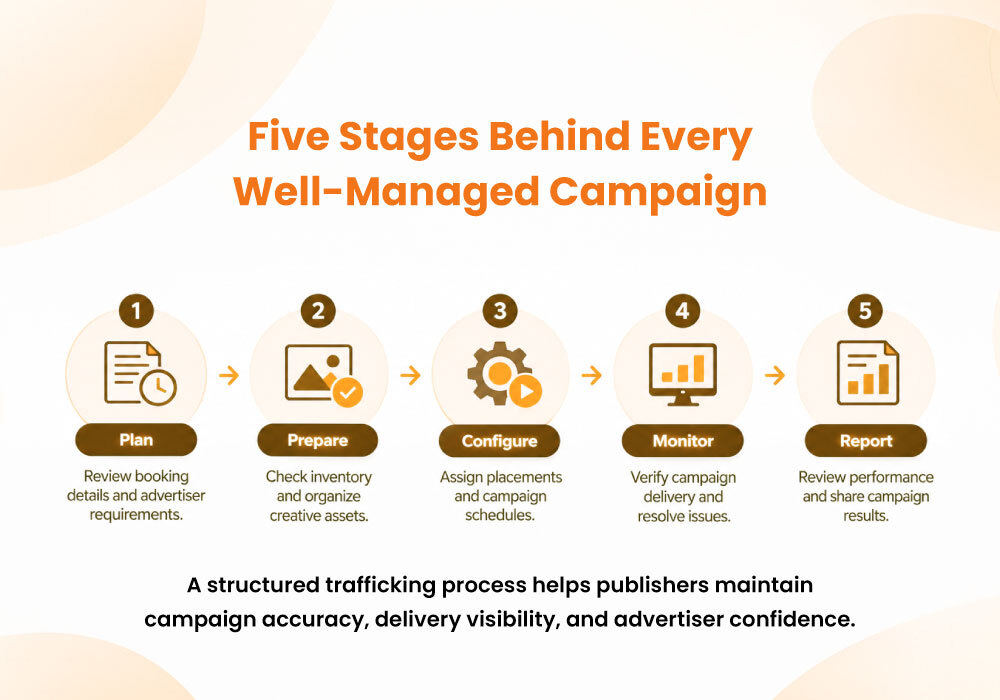
17. How RevAdOps Supports the Campaign Trafficking Process
Managing direct-sold campaigns requires attention at every stage, from inventory organization to final reporting.
For publishers with limited internal AdOps resources, these responsibilities can become difficult to manage consistently.
RevAdOps supports publishers with direct advertising operations, helping manage the processes that keep campaigns organized and running effectively.
Its services include:
Ad Inventory Management
Organizing advertising inventory and helping publishers maintain better visibility into available placements and advertising opportunities.
Campaign Setup and Trafficking
Supporting campaign configuration, creative coordination, scheduling, and the operational requirements involved in campaign delivery.
Campaign Optimization
Reviewing campaign performance and identifying opportunities to improve delivery and make better use of advertising inventory.
Performance Reporting
Providing detailed campaign reporting to help publishers understand delivery and communicate campaign results more effectively.
RevAdOps works as an extension of the publisher's team, supporting the operational work behind direct-sold advertising.
This allows publishers to focus more effectively on their audiences, advertisers, and broader business priorities while maintaining a structured approach to campaign management.
Conclusion: Every Successful Campaign Depends on a Clear Process
Campaign trafficking is the operational foundation of direct-sold digital advertising.
It connects the advertiser's booking with the actual campaign experience on a publisher's website.
From reviewing campaign requirements and checking inventory to managing creative assets, configuring schedules, testing advertisements, monitoring delivery, and preparing reports, every stage contributes to successful campaign execution.
When these steps are handled without a consistent process, publishers may experience unnecessary delays, repeated corrections, scheduling conflicts, and advertiser dissatisfaction.
A structured trafficking workflow helps reduce these challenges.
It gives teams better visibility, improves coordination, supports accurate campaign delivery, and creates a more reliable experience for advertisers.
Because a campaign is not complete when it is sold. It is complete when it has been properly delivered, monitored, and reported.
For publishers looking to build stronger direct advertising operations, understanding and improving campaign trafficking is an important place to start.
Leave a reply
Your email address will not be published. Required fields are marked *