



Introduction
For digital publishers, direct-sold advertising can be an important source of revenue and a valuable way to build long-term relationships with advertisers. Unlike arrangements where publishers have limited involvement in campaign planning, direct-sold advertising allows publishers and advertisers to work together on campaign objectives, placements, timelines, and delivery expectations.
However, securing an advertising deal is only the beginning. Once an advertiser agrees to run a campaign, the publisher must turn that agreement into an organized, executable plan. Ad placements need to be confirmed, creative assets must be collected, campaign dates must be scheduled, and delivery must be monitored. The publisher also needs to communicate clearly with the advertiser and report on campaign performance.
This process is known as campaign setup.
A well-organized campaign setup helps prevent mistakes, reduces unnecessary back-and-forth, and makes it easier for publishing teams to deliver what they promised. It also creates a more professional experience for advertisers, who want confidence that their campaigns will run as planned.
Whether you manage a local news website, a digital magazine, or a publisher portfolio with multiple advertising opportunities, understanding the basics of campaign setup can improve the way your team handles direct-sold advertising.
In this guide, we will explain the essential steps involved in setting up a direct ad campaign, from gathering advertiser requirements to monitoring delivery and preparing reports.
1. Understand What Campaign Setup Means
Campaign setup is the process of preparing an advertising campaign for delivery after an agreement has been reached with an advertiser.
It connects the sales process with the operational work required to publish an advertisement correctly. The sales team may negotiate the campaign, agree on pricing, and confirm the advertiser's objectives. The ad operations team then translates those commitments into specific tasks, schedules, placements, and delivery requirements.
A typical direct-sold campaign setup includes:
Confirming campaign objectives and advertiser requirements.
Reviewing the agreed placements and advertising formats.
Checking available inventory and campaign dates.
Collecting and reviewing creative assets.
Recording campaign details in an organized system.
Coordinating with the relevant publishing teams.
Checking that the advertisement appears correctly.
Monitoring delivery and preparing performance reports.
Each step contributes to the campaign's success. If an important detail is missed during setup, the problem may appear later as a delayed launch, an incorrect placement, or a campaign that fails to meet the advertiser's expectations.
The objective is simple: ensure that everyone involved understands what has been sold, what needs to be delivered, and how success will be measured.
2. Start With Clear Campaign Requirements
Before scheduling an advertisement, the team must understand exactly what the advertiser has purchased.
A sales agreement may contain the broad terms of a campaign, but the operations team needs enough detail to execute it accurately. Unclear requirements can lead to repeated emails, conflicting instructions, and avoidable mistakes.
Begin by collecting the essential campaign information.
Advertiser details: Record the advertiser's name, brand, primary contact, and any agency or account manager involved.
Campaign objective: Establish what the advertiser wants to achieve. The objective might be brand awareness, website traffic, product visibility, event promotion, or lead generation.
Campaign dates: Confirm the start date, end date, and any deadlines for submitting creative assets.
Placement requirements: Identify the agreed website sections, pages, advertising positions, and formats.
Commercial terms: Record the agreed price, campaign duration, contracted impressions if applicable, and any other delivery commitments included in the agreement.
Creative requirements: Document the specifications, file formats, dimensions, destination URLs, and any approval requirements.
Reporting expectations: Confirm which performance metrics will be shared, how frequently reporting will occur, and when the final report is expected.
Having these details in one place establishes a shared understanding between sales, ad operations, and the advertiser.
For example, an advertiser purchasing a homepage banner for a two-week product launch should not have to clarify the campaign dates, creative dimensions, or destination URL after the campaign is scheduled. Those details should already be confirmed.
The more complete the campaign brief, the easier it becomes to move into execution.
3. Check Inventory Before Scheduling the Campaign
Ad inventory refers to the advertising space a publisher has available to sell across its website, app, or other digital properties.
Inventory can include homepage banners, article-page placements, category-page advertisements, sponsored content positions, and other formats offered by the publisher.
Before scheduling a direct-sold campaign, the team needs to verify that the agreed placement is available for the requested dates.
This step is particularly important when several advertisers want similar placements or when a publisher has promised specific positions to existing clients.
A practical inventory review should answer three questions:
Is the placement available? Confirm that the requested advertising position can accommodate the new campaign.
Does the schedule work? Check whether the requested dates conflict with existing bookings or reserved inventory.
Can the commitment be delivered? Review the placement's expected traffic, format requirements, and any agreed impression targets.
Consider a publisher that sells a premium homepage banner to an advertiser for the first week of November. If that position is already committed to another campaign during the same period, the team needs to identify the conflict before confirming the new booking.
An inventory calendar or centralized booking record can help the team see which placements are booked, reserved, or available.
Accurate inventory checks protect the publisher from overbooking and help sales teams make commitments they can fulfill.
4. Confirm the Campaign Schedule
Once inventory availability has been verified, the campaign needs a clear schedule.
A campaign schedule defines when the advertisement should begin appearing, when it should stop, and how it fits into the publisher's existing commitments.
The schedule should include the campaign's start and end dates, the relevant time zone, any special launch requirements, and internal deadlines for creative submission and approval.
It is also useful to work backward from the launch date.
For example, if a campaign must go live on November 10, the publisher might establish internal deadlines for receiving creative assets, checking specifications, obtaining advertiser approval, and completing final placement checks.
These deadlines will vary according to the campaign's complexity, so the team should agree on a realistic timeline rather than assume that every campaign can be launched immediately.
A clear schedule helps everyone understand their responsibilities and reduces the risk of last-minute requests.
It also allows the publisher to coordinate multiple campaigns without losing track of individual launch dates.
For campaigns involving several placements, the team should verify that every component follows the agreed schedule. A campaign with a homepage banner, article-page placement, and sponsored content component may require separate preparation steps even when all three launch on the same day.
The goal is to make campaign timing clear, achievable, and visible to everyone who needs the information.
5. Collect and Review Creative Assets

Creative assets are the materials used to display the advertiser's message. Depending on the campaign, these may include banner images, animated creatives, headlines, advertising copy, logos, landing-page URLs, and other approved materials.
Collecting these assets is one of the most important parts of campaign setup because missing or incorrect creative files can delay a launch.
Start by providing the advertiser with clear creative specifications.
These should explain the required dimensions, accepted file types, file-size limits, naming conventions, and any relevant publisher guidelines. If the campaign includes several placements, provide the requirements for each format.
When the assets arrive, review them before scheduling the final launch.
Check that:
The creative dimensions match the intended placement.
The file format is supported by the publisher's website.
Images and text display clearly.
The advertiser's branding is correct.
The destination URL works and points to the intended page.
The creative follows the publisher's content and advertising policies.
Any required advertiser approvals have been received.
For example, a banner designed for a large desktop placement may not be suitable for a smaller mobile position. If the publisher has promised both placements, the team should confirm that the appropriate creative versions are available.
It is also important to maintain a clear record of the approved assets. If the advertiser sends several revisions, the team should identify which version is final and ensure that an outdated file is not used accidentally.
A consistent creative-review process reduces launch delays and helps protect the publisher's professional standards.
6. Record Campaign Details Accurately
Once the requirements, inventory, schedule, and creative assets have been confirmed, the campaign details need to be recorded in a consistent format.
This record becomes the operational reference for the campaign. Anyone working on the account should be able to understand the booking without searching through multiple email conversations.
A campaign record should generally include:
Campaign name and unique identifier.
Advertiser and primary contact.
Campaign objective.
Agreed placements and formats.
Start and end dates.
Pricing and contracted deliverables.
Creative asset locations and approval status.
Destination URLs.
Campaign status and outstanding tasks.
Reporting requirements.
Publishers can maintain these details in an ad operations platform, a structured campaign management system, or a carefully maintained shared record appropriate to their scale.
The specific tool matters less than the consistency of the process. If different team members use different naming conventions or store campaign information in separate locations, finding the correct details becomes harder.
For example, a campaign called "Holiday Sale" may be difficult to distinguish from several other seasonal campaigns. A more descriptive name, such as "Brand A — Holiday Sale — November," makes the booking easier to identify.
Accurate records also support better communication between sales and operations. The team can verify the original commitment, check the campaign's current status, and identify missing information without repeatedly asking the advertiser for details already provided.
Good recordkeeping is not simply administrative work. It is part of reliable campaign delivery.
7. Prepare the Ad Placement and Test It
After the campaign details have been recorded, the team can prepare the advertisement for its intended placement.
The exact implementation depends on the publisher's website, advertising tools, and internal workflow. However, the underlying objective remains the same: ensure that the approved creative appears in the correct location and behaves as expected.
Before launch, verify that the placement matches the campaign agreement.
Check the website section, page type, device requirements, creative version, destination URL, and campaign dates. If the publisher has specific rules about how advertisements appear alongside editorial content, confirm that those rules are followed.
Testing should also cover the visitor experience.
Does the advertisement display correctly? Is the image distorted? Is important text cut off? Does the destination link open the intended page? Does the creative appear appropriately on mobile and desktop?
These checks may seem small, but they can make a significant difference to the advertiser's experience.
Imagine a campaign that launches on schedule but displays an outdated offer or directs visitors to the wrong product page. The campaign may technically be live, yet it fails to deliver the intended experience.
A pre-launch checklist helps catch these issues before the advertiser or audience encounters them.
Where possible, have another team member review the setup for important campaigns. A second review can help identify mistakes that the person preparing the campaign may overlook.
The campaign should move to launch only after the necessary checks are complete and any outstanding issues have been resolved.
8. Coordinate With Sales, Editorial, and Other Teams
Direct-sold advertising often involves more than one department.
Sales teams manage advertiser relationships and commercial commitments. Ad operations teams prepare and monitor campaigns. Editorial or website teams may need to support sponsored content, page placements, or changes to the publishing environment.
When responsibilities are unclear, important tasks can fall between teams.
For example, the sales team may assume that the advertiser has submitted the final banner, while the operations team is still waiting for the approved file. Alternatively, the operations team may prepare a campaign without knowing that the advertiser has requested a specific launch time.
A clear handoff process can prevent these problems.
Every campaign should have an identified owner, a defined set of responsibilities, and a place where updates are recorded. The team should know who is responsible for collecting creative assets, approving materials, preparing placements, checking delivery, and communicating with the advertiser.
It is also helpful to establish a process for handling changes.
If an advertiser requests a new creative or a revised end date, the team should record the change, confirm whether it affects the original agreement, and communicate the updated instructions to everyone involved.
Regular communication does not have to mean more meetings. A shared campaign tracker, clear status updates, and a consistent handoff checklist can often resolve routine questions efficiently.
The aim is to ensure that each team works from the same information.
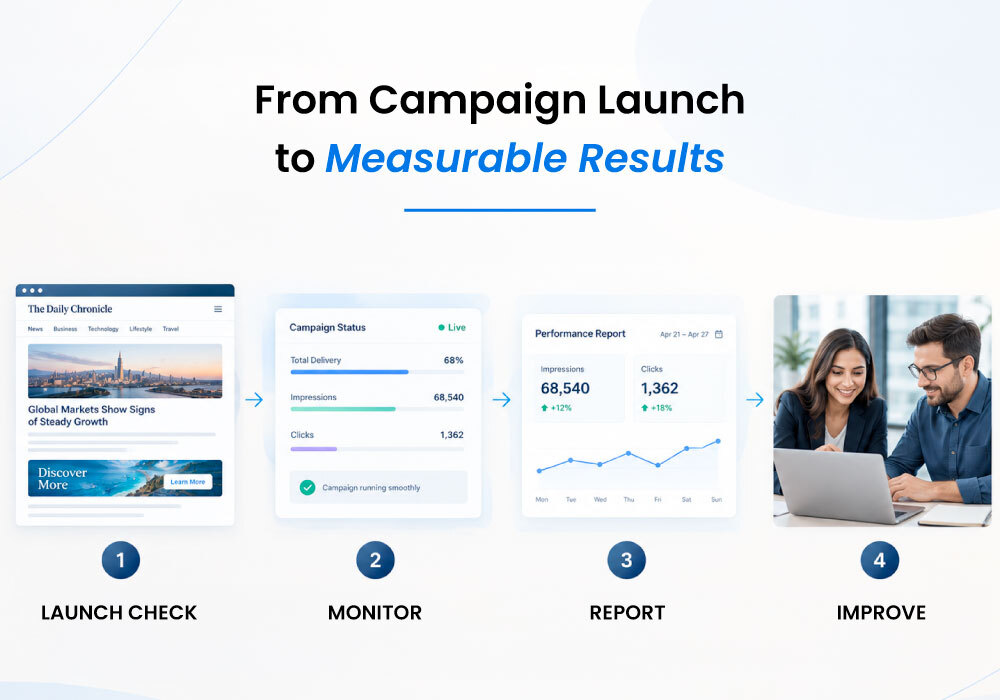
9. Monitor Campaign Delivery After Launch
Campaign setup does not end when an advertisement goes live.
Once a campaign launches, the publisher must verify that it is delivering as expected. Monitoring helps identify issues early enough for the team to investigate and take corrective action.
The relevant checks depend on the campaign agreement and the publisher's reporting capabilities.
For example, a publisher may need to review whether the advertisement is appearing on the intended pages, whether the campaign is running within its scheduled dates, and whether delivery is progressing toward an agreed impression target.
Other campaigns may focus on clicks, website visits, or engagement with sponsored content.
The team should compare actual delivery with the original commitment and investigate significant differences.
If a campaign is receiving less traffic than expected, possible explanations may include changes in website traffic, an incorrect placement, a technical issue, or a mismatch between the expected and actual delivery period.
The team should first identify the cause before deciding on a solution.
Depending on the agreement, corrective action might involve adjusting the schedule, reviewing the placement, coordinating a creative correction, or discussing an appropriate make-good with the advertiser.
Publishers should avoid waiting until the campaign's final day to discover that delivery has fallen behind.
A defined monitoring schedule makes it easier to identify problems early, communicate clearly, and protect advertiser confidence.
10. Prepare Clear and Useful Campaign Reports
Reporting allows publishers to demonstrate what a direct-sold campaign delivered and helps advertisers understand the results of their investment.
A useful report should reflect the campaign's original objectives and contractual commitments. It should not simply present a collection of numbers without explaining what they mean.
Depending on the campaign, relevant metrics may include:
Impressions: The number of times the advertisement was displayed, according to the publisher's measurement method.
Clicks: The number of recorded clicks on the advertisement.
Click-through rate (CTR): The percentage of measured impressions that resulted in clicks.
Delivery against commitment: How actual delivery compares with the agreed target, where applicable.
Campaign period: The dates covered by the report.
For example, if a campaign recorded 50,000 impressions and 250 clicks, its click-through rate would be 0.5%, assuming the impression and click figures use compatible measurement definitions.
Reports should also explain the reporting period and any relevant limitations in the available data.
Most importantly, reporting should match the advertiser's expectations. If the agreement promises a post-campaign report, the publisher should know who will prepare it and when it will be delivered.
Consistent reporting demonstrates accountability and gives advertisers a clearer view of campaign delivery.
It can also create a useful starting point for future conversations. Once the team understands which placements and creative approaches performed well, it can discuss opportunities for future campaigns based on the available evidence.
11. Avoid Common Campaign Setup Mistakes
Even experienced publishing teams can encounter problems when campaign setup lacks a consistent process.
Several common mistakes are worth watching for.
Starting without complete requirements: Missing dates, placements, URLs, or creative specifications create unnecessary delays. Confirm the essential details before moving forward.
Skipping inventory checks: A placement may already be committed to another advertiser. Verify availability before confirming the booking.
Using outdated creative files: Multiple revisions can create confusion. Maintain a clear record of the final approved version.
Relying on scattered emails: Important campaign details can become difficult to find. Keep the latest instructions and decisions in a central record.
Overlooking pre-launch testing: An advertisement may be scheduled correctly but display incorrectly. Check the creative, placement, and destination link before launch.
Failing to monitor delivery: Campaign problems can remain unnoticed until the advertiser asks for an update. Establish regular delivery checks.
Delaying reporting: Late or unclear reports can weaken advertiser confidence. Define reporting responsibilities and deadlines during setup.
These mistakes often share the same underlying cause: information is not captured, communicated, or checked consistently.
A standardized process helps reduce these risks without making campaign management unnecessarily complicated.
12. Build a Repeatable Campaign Setup Checklist
A campaign setup checklist gives the team a practical way to confirm that every essential task has been completed.
Instead of relying on individual memory, the team follows the same sequence for each campaign while allowing for the specific requirements of different advertisers.
A basic checklist can include the following stages:
Before setup
Confirm the advertiser's requirements.
Review the signed agreement or approved booking.
Verify inventory availability.
Confirm campaign dates and deliverables.
During setup
Record the campaign details.
Collect and approve creative assets.
Confirm the destination URL.
Prepare the agreed placements.
Coordinate any required internal approvals.
Before launch
Check the campaign schedule.
Verify the creative and placement.
Test the destination link.
Confirm that the campaign is ready to go live.
After launch
Verify that the advertisement is displaying correctly.
Monitor delivery against the agreement.
Communicate any significant issues.
Prepare and deliver the campaign report.
Record lessons that may help future campaigns.
The checklist should be easy to use and updated when the publisher's requirements change.
For straightforward campaigns, a simple list may be sufficient. More complex campaigns may require additional approval steps or separate checklists for different advertising formats.
The objective is not to create paperwork for its own sake. It is to make reliable campaign delivery repeatable.
13. When Ad Operations Support Makes a Difference
As a publisher's advertising business grows, the operational work behind direct-sold campaigns can become increasingly demanding.
A small team may initially manage bookings, creative assets, scheduling, campaign checks, and reporting through email and spreadsheets. Over time, multiple simultaneous campaigns can make it harder to maintain accurate records and consistent delivery.
Ad operations support can help publishers manage this complexity.
An experienced AdOps team can assist with campaign setup, inventory coordination, creative checks, campaign monitoring, troubleshooting, and reporting. It can also help establish repeatable processes that make responsibilities clearer across sales and operations.
This support is especially useful for publishers that have valuable audiences and established advertiser relationships but limited internal capacity for handling day-to-day digital campaign execution.
The goal is not to remove the publisher's control over its advertising business. Instead, it is to ensure that the operational work behind each campaign is handled consistently and professionally.
When campaign details are organized, placements are checked, delivery is monitored, and reports are prepared on time, the publisher can spend less time resolving avoidable operational problems and more time developing advertiser relationships and growing direct-sold revenue.
Conclusion
Campaign setup is one of the foundations of successful direct-sold advertising.
A publisher may have strong website traffic, valuable advertising placements, and willing advertisers, but those advantages can be undermined by unclear requirements, poor scheduling, missing creative assets, and inconsistent monitoring.
A structured campaign setup process helps turn an advertising agreement into a clear operational plan. By confirming requirements, checking inventory, organizing campaign records, reviewing creative assets, testing placements, monitoring delivery, and reporting results, publishers can improve reliability at every stage.
The most effective approach does not have to be complicated. It needs to be consistent, transparent, and suited to the publisher's business.
For digital publishers looking to strengthen direct-sold advertising, the next step is to review the current campaign workflow and identify where information gets lost, tasks are repeated, or errors occur.
Improving those processes can help campaigns run more smoothly, strengthen advertiser confidence, and create a more dependable foundation for long-term advertising revenue.
Better campaign setup starts with clear information, defined responsibilities, and consistent execution.
Leave a reply
Your email address will not be published. Required fields are marked *